 Leech Software
The app, window by window.
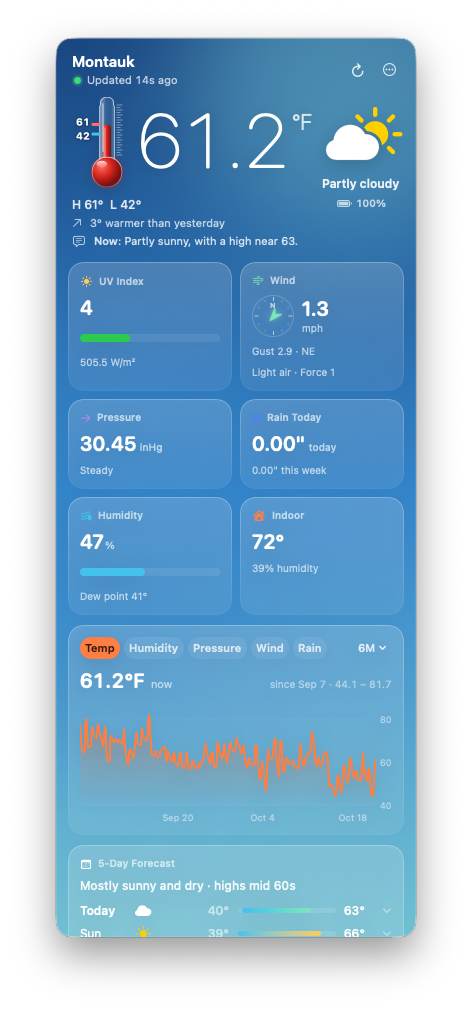
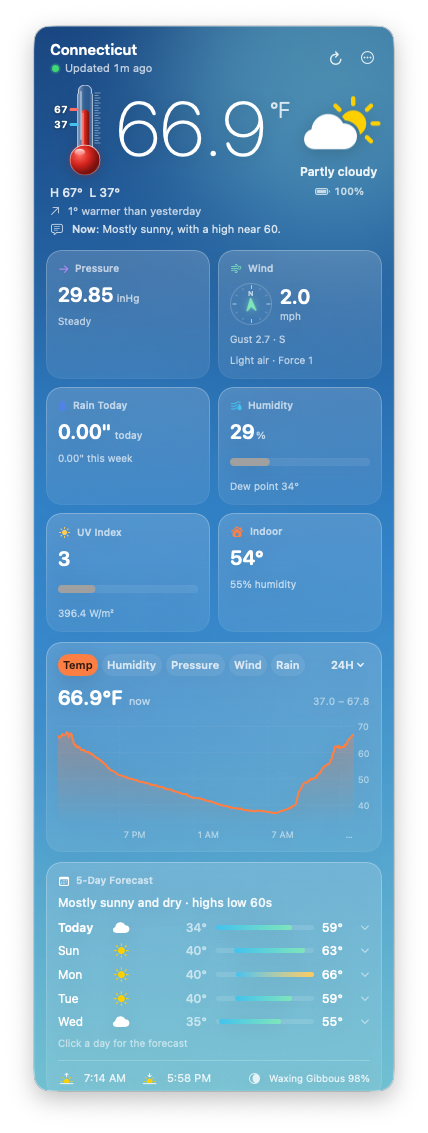
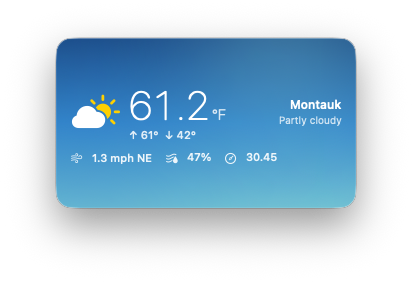
The menu bar panel, station windows, mini mode and sensor cards, captured straight from the app. Everything shown is sample data from demo mode. For how each one works, see the user guide.
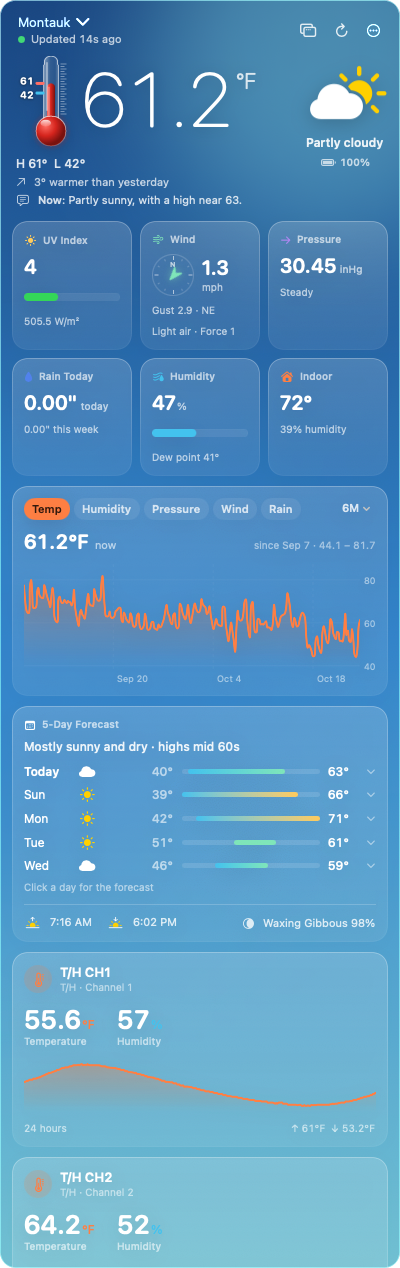
Click the icon, and there's your station.
Outdoor temperature on a thermometer with today's high and low, the sky, humidity, pressure and its trend, wind on a compass, rain today and this week, UV and solar, indoor conditions, and how today compares with yesterday.
Readings arrive every two minutes from Ecowitt Cloud, or straight from a gateway on your own network. Drag the cards and tiles into the order you like; each station remembers its own.
A window for every station.
Pull the panel off the menu bar and it becomes a window you can keep anywhere. Resize it, set it to stay on top, or sink it to the desktop behind your other windows, where it sits like a clock on the wall.
More than one station? Open each in its own window. Every window keeps its own station, size and place.
Just the essentials.
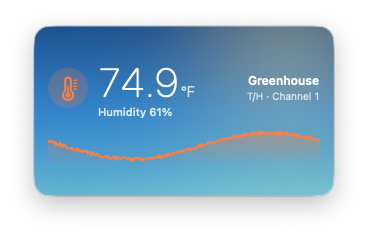
Shrink a window to just the essentials — temperature, high and low, wind, humidity and pressure — small enough to tuck into a corner of the screen. Or show one sensor instead: the greenhouse, the attic, the pond, each with a little graph of its day.
No weather station needed.
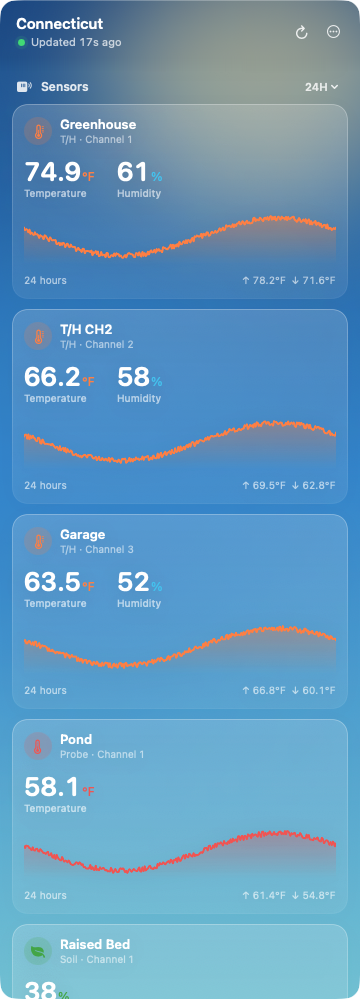
Only have a gateway and some sensors? That's enough. Every sensor gets a full card of its own — temperature and humidity, soil moisture, temperature probes, leaf wetness, PM2.5 and CO₂, lightning, water level and leak sensors — with its readings large and a graph you can hover.
Drag any sensor card out of the panel and drop it on the desktop to give that sensor a window of its own.
Up to a year of history.
Temperature, humidity, pressure, wind and rain from the last 24 hours back to a full year, with rain as bars by the hour, day or week. Every sensor's graph goes just as far back. Hover anywhere to read the exact value and time.
From your account
Cloud stations fill their history from your account at ecowitt.net — the app fetches any stretch it missed the next time it opens, so the graphs have no gaps.
From the card, no account needed
Gateways with a microSD card keep months of readings on the card. The app reads them over your network, so a year of history is available without an Ecowitt account.
Read more about history in the guide.
Watching around the clock.
The Mac is always on, so Dashboard for Ecowitt watches every station on your account and lets you know: frost tonight, pressure falling fast, rain starting or stopping, lightning nearby, gusts or rain above limits you set, a sensor's battery running low, a station gone quiet.
Notifications that matter
A daily summary each morning if you like, and quiet hours when you don't. Alerts arrive as ordinary macOS notifications.
- Frost tonight and freezing
- Pressure falling fast
- Rain starting and stopping
- Lightning nearby
- Gust, rain and temperature limits you set
- Low batteries, quiet sensors, offline stations
A loud alarm when water is detected
If a leak sensor gets wet, you get an emergency alert and a loud alarm that repeats until you've seen it — even with other alerts off, even during quiet hours.
Every alert is explained in the guide.
What's coming, too.
5‑day forecast
For your station's location, with sunrise, sunset and the moon phase.
Written forecast (US)
The National Weather Service's wording for right now, and a paragraph for each day ahead.
Weather radar (US)
A NOAA radar picture for the nearest radar site, refreshed every ten minutes.
Your readings stay yours.
Your readings go between your Mac and Ecowitt, your gateway, and the weather services — nowhere else. Your Ecowitt keys live in your Mac's keychain. There are no analytics and no ads. Read the privacy policy.
The same dashboard, in your pocket.
The same app on iPhone, iPad and Apple Watch, with widgets for the home screen and complications for the watch face. One free App Store listing covers them all.
Up and running in a minute.
Download it, free
Get it on the Mac App Store. No in‑app purchases, no ads, no subscription.
Connect your station
Sign in to Ecowitt Cloud and the app fills in your keys, or let it find your gateway on the local network.
Or try the demo
No station yet? Choose the sample dashboard and look around first.
Keep it watching
Turn on Open at login, and your station is always one click away.
The specs.
- app
- Dashboard for Ecowitt, also called Weathervane
- developer
- Leech Software, Inc. · New York, NY
- requires
- macOS 14 Sonoma or later · an Ecowitt gateway or console
- devices
- Mac — also on iPhone, iPad and Apple Watch
- category
- Weather · Rated 4+
- price
- Free. No in‑app purchases, no ads, no subscription
- data
- Ecowitt Cloud or the gateway's local interface
- privacy
- No analytics, no tracking. Read the policy
- download
- apps.apple.com/app/id6812456607
- support
- Email Us… inside the app (••• menu), or the contact form
- tip jar
- buymeacoffee.com/leechsoftware
Dashboard for Ecowitt is independently developed and is not affiliated with or endorsed by Ecowitt. Ecowitt and related product names are trademarks of their respective owners. Apple, Mac and macOS are trademarks of Apple Inc.
Frequently asked.
Do I need the iPhone app?
No. The Mac app connects to your station by itself, over Ecowitt Cloud or your local network. If you also use the iPhone app, both are the same free listing on the App Store.
Do I need an Ecowitt account?
No. On your home network the app finds your gateway and reads it directly. An Ecowitt Cloud account is optional, and lets you watch stations from anywhere and fills in history.
Does it work without a weather station?
Yes. A gateway and some sensors are enough. Every sensor gets a full card with large readings and a graph, and any sensor card can become a small desktop window of its own.
How far back do the graphs go?
Up to a year. Ecowitt Cloud stations fill their history from your account; gateways with a microSD card fill it from the card over your network, no account needed.
Is it really free?
Yes. No in‑app purchases, no subscription, no ads, no analytics and no tracking. It only talks to Ecowitt, your gateway and the weather services.
What's "Weathervane"?
Weathervane is the app's family name — the name you'll see in its menus and About box. On the Mac App Store it's listed as "Dashboard for Ecowitt", by Leech Software, Inc.
Get in touch
Questions about the app, feature requests, or a bug to report? We reply to every serious message, usually within a day. You can also choose Email Us… from the ••• menu inside the app.