◂ LEECH SOFTWARE DASHBOARD FOR ECOWITT
iOS App
A Weathervane app · by Leech Software

Dashboard for Ecowitt

Your Ecowitt station · right on your iPhone & iPad

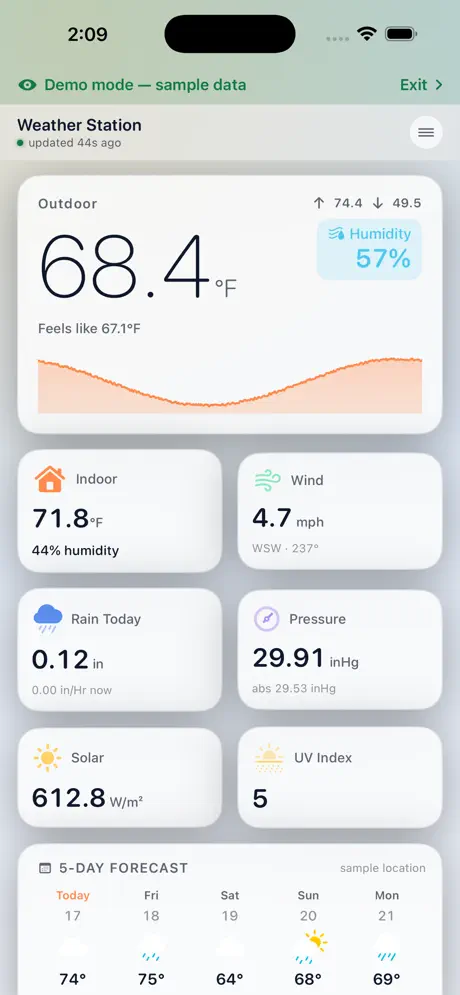
Connect through Ecowitt Cloud or straight to your gateway on local Wi-Fi, and Dashboard for Ecowitt turns your station's live readings into a clean, fast, native dashboard — with charts, forecasts, widgets, and zero ads or tracking.

Dashboard for Ecowitt on iPhone showing outdoor temperature, indoor, wind, rain, pressure, solar, UV and a 5-day forecast
Why it exists

A cleaner way to see your station.

Dashboard for Ecowitt is a free, modern alternative to the official app for owners of Ecowitt personal weather stations. It puts every sensor on your gateway into one polished, at-a-glance dashboard.

It's simple enough for anyone to set up, with the depth weather enthusiasts expect. And it only shows what your station actually measures, so there are no empty sections for gear you don't own.

“Built by an Ecowitt station owner who just wanted a better way to see the weather out back.”Leech Software, Inc. · New York
What it shows

Every reading your station sends.

Live data in a clean card layout, with the outdoor conditions front and center: current temperature, feels-like, daily high and low, and a trend chart for the day.

Temperature
Humidity
Dew point
Pressure
Wind speed & direction
Rainfall
Solar radiation
UV index
Air quality
Lightning
Soil moisture
Leak status
Battery levels
Signal strength
Sunrise & sunset
Moon phase

Available readings depend on your gateway, firmware, and connected sensors.

Two ways to connect

Anywhere, or right at home.

// Ecowitt Cloud

Monitor from anywhere

Connect your Ecowitt account and keep an eye on your station from work, on the road, or across the world.

  • Remote monitoring
  • Multiple stations
  • Works with stations uploading to Ecowitt Cloud
// Local Wi-Fi

Straight from your gateway

On your home network, the app can discover compatible gateways and read them directly over the local interface.

  • Automatic gateway discovery
  • Direct local connection
  • Fast, fresh readings
Features

Built for your station.

Historical Charts

Tap any reading for smooth, scalable charts — temperature swings, pressure trends, rain totals over time.

Weather Forecast

A multi-day forecast for your station's location, right under your live readings.

Home & Lock Screen Widgets

Glance at your own station without opening the app — on the Home Screen or Lock Screen.

Multiple Stations

Track more than one station and switch between them instantly.

Sun & Moon

Sunrise and sunset times, plus moon phase and illumination, alongside your station's data.

Sensor Details

Drill into every connected sensor — battery level, signal strength, and its latest readings.

Offline Warnings

Data-freshness indicators tell you when a station or sensor stops reporting.

Custom Names

Rename stations and sensors — “Greenhouse,” “Basement,” “Back Fence” — so you know what's what.

Demo Mode

Explore every screen with realistic sample data before you connect a station. Tap Exit on the green banner to connect your own.

Light & Dark

Native light and dark appearances that follow your iPhone or iPad.

Your Units

Fahrenheit or Celsius, inches or millimeters — set it once and it sticks.

Private by Design

No analytics, no ad SDKs, no tracking. Your data goes between your device and Ecowitt, nowhere else.

Compatibility

Works with your gear.

Supports Ecowitt station packages and consoles used through a compatible gateway, the local interface, or Ecowitt Cloud.

Gateway families

GW1100GW1200GW2000GW3000GW3010

Stations, packages & consoles

GW1101GW1201GW1202GW1210GW2001GW3001GW3002WittboyEssense3WS2320WS2910WS3800WS3820WS3900WS3910WN1981HP2551HP2552HP2553HHP2561

Other Ecowitt models may also work if they provide the standard local API or upload data to Ecowitt Cloud.

Getting started

Up and running in a minute.

Download it, free

Get Dashboard for Ecowitt on the App Store. No in-app purchases, no ads, no subscription.

Connect your station

Choose Ecowitt Cloud, or let the app find your gateway on local Wi-Fi.

Or just try the demo

No station yet? Open demo mode and explore every screen with realistic sample data.

Add a widget

Put your station on your Home Screen or Lock Screen and check the weather without opening anything.

Technical details

The specs.

dashboard-for-ecowitt — specs
app
Dashboard for ECOWITT Weather
developer
Leech Software, Inc. · New York, NY
version
1.1
requires
iOS 17.0 or later
devices
iPhone & iPad (universal)
category
Weather · Rated 4+
price
Free — no in-app purchases, no ads, no subscription
data
Ecowitt Cloud or local gateway interface
privacy
No analytics, no tracking — read the policy
download
apps.apple.com/app/id6812456607

Dashboard for Ecowitt is independently developed and is not affiliated with or endorsed by Ecowitt. Ecowitt and related product names are trademarks of their respective owners.

Transmission

Get in touch

Questions about the app, feature requests, or a bug to report? We reply to every serious message — usually within a day.